Blaupunkt Help
FAQs
SA 2700 – IR-S1 PIR sensor not working / LED not working / PIR sensor not detecting
Modified on: Tue, 15 Dec, 2015 at 3:27 PM
The PIR sensor in the Blaupunkt Security System may appear not to work even when the alarm is activated or deactivated.
Please note the following very important factors on how the PIR operates.
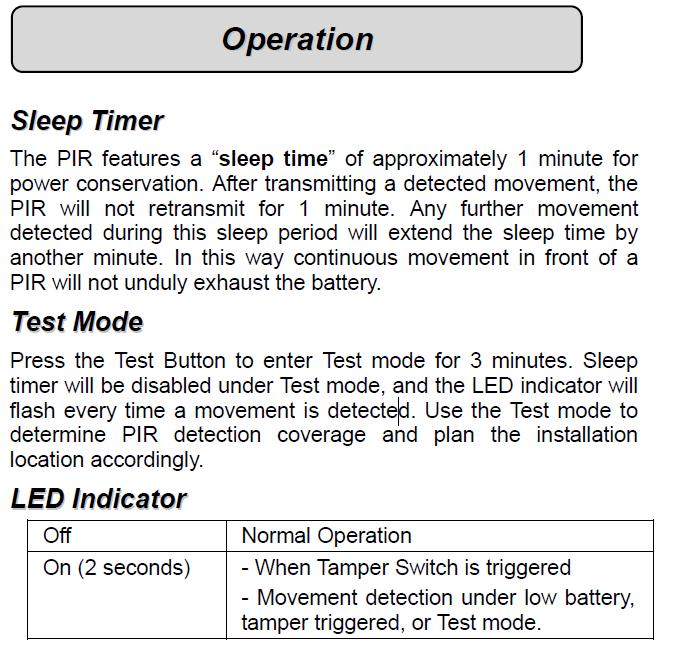
1. When you first set up the PIR sensor using the Learn/Test button the LED will keep on lighting up for a period of 3 min to allow you to detect coverage and plan your installation of the PIR sensor. After 3 min the light will switch off and not come on unless the Learn/Test button is pressed again. The light ONLY operates during this time to save the battery as continuous use will drain the battery in a short period of time.
2. Sleep Timer. This is an important function of the PIR sensor as it is also designed to save the battery. Continuous detection will drain the battery in a short period of time. Therefore the system will only detect once every 1 min. However any new detection in this 1min time frame will reset the “sleep time” back to 1min regardless if the alarm is Activated or Deactivated.
LED Indicator is only ON for 3min during the “test mode” process.
LED indicator is always OFF after the initial “test mode” process. During the day to day operation of the alarm system the LED indicator will remain OFF to save battery power. See LED indicator table below.
For further information please see the explanation below from the Blaupunkt IR-S1 PIR user guide:
Did you find it helpful?
Yes
No
Send feedback
Sorry we couldn’t be helpful. Help us improve this article with your feedback.